6.2.5 Operating the joystick
You can use the joystick to manoeuvre the boat more smoothly at slow speeds.
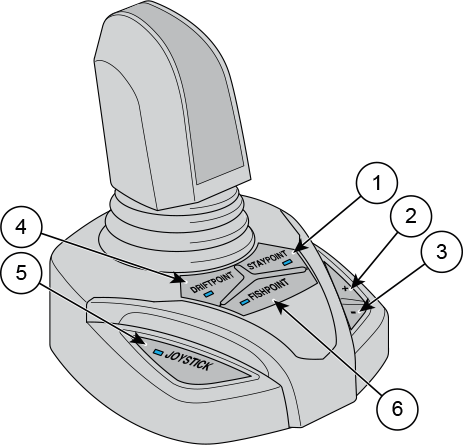
1 | Staypoint button | 4 | Driftpoint button |
2 | Plus (+) button | 5 | Joystick button |
3 | Minus (-) button | 6 | Fishpoint button |
Position the remote control and the joystick to neutral position and press the JOYSTICK button on the joystick base.
An indicator LED on the button lights up to show that the joystick is active.
To return to normal operating mode, press the JOYSTICK button again. Alternatively, activate the forward or reverse gear by turning the remote control lever.
-
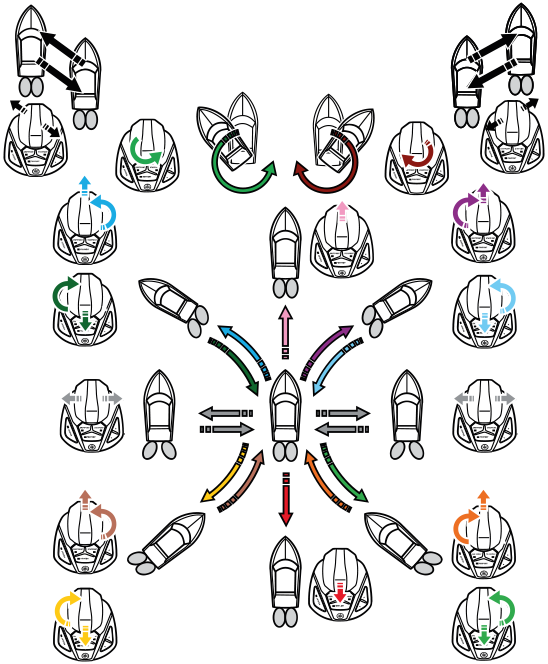
Push the joystick forward to move the boat forward. Pull the joystick backwards to make the boat reverse.
-
Push the joystick left to move the boat left. Push the joystick right to move the boat right.
-
Twist the joystick to turn the boat around its axle.
-
Turn the joystick left, right or diagonally to make the boat move diagonally to desired direction.
-
Push the joystick forward and twist it to move the boat forward while turning to direction of the twist. Pull the joystick backward and twist it to move the boat backward while turning to direction of the twist.
-
Use the plus (+) and minus (-) buttons to adjust the engine speed in Driftpoint, Fishpoint and Joystick operation modes. The speed adjustment has five different levels.
For more information on the Driftpoint, Staypoint and Fishpoint functions, see the separate Autopilot user manual.
You can calibrate the joystick via the CL-5 display. For more information, see the CL-5 user manual.
For more detailed instructions on the joystick, see the Joystick Quick Guide that is delivered with your boat.