6.2.5.1 Integrated bow thruster controller
Your boat can be equipped with a feature that allows you to control the bow thruster using the Yamaha joystick.
On the autopilot panel, press F1 button.
Activate the joystick by positioning the remote control and the joystick to neutral position and pressing the JOYSTICK button on the joystick base.
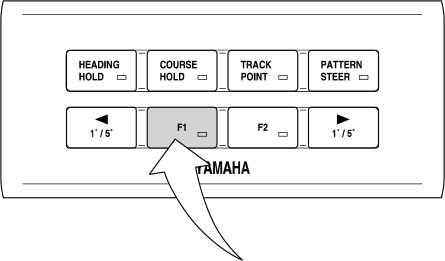
When the integration is activated, you can control the bow thruster with both the bow thruster controller and the Yamaha joystick.
If the control devices are used simultaneously, the one with a larger input value is dominant. If the inputs from the two devices are in opposite directions, the bow thruster is not affected.
The F1 button stays activated until you switch it off. This allows you to switch to an alternative helm station or joystick station, if applicable, and use the integration from there.
The joystick controls are the same as without integration. With integration bow thruster operation is added automatically to help move the boat.
The controls are proportional, so you can add as much of force to the thruster as you wish. When done correctly, the boat can almost travel sideways.
Use the plus (+) and minus (-) buttons to adjust the engine speed in five levels.
To return to normal operating mode, press the JOYSTICK button again. Alternatively, activate the forward or reverse gear by turning the remote control lever.